MCP vs API: What's Actually Different (And When to Use Each)
MCP vs API: What’s Actually Different (And When to Use Each)
Bottom line up front: MCP (Model Context Protocol) and traditional APIs solve different problems for different users. APIs are built for developers who write explicit code against known endpoints. MCP is built for AI agents that need to discover what tools exist at runtime and reason about how to use them. MCP doesn’t replace APIs — most MCP servers are just intelligent wrappers around REST APIs underneath. If you’re building a traditional app, use an API. If you’re building an AI agent that needs to orchestrate multiple services, MCP is the better fit.
| Dimension | Traditional API | MCP |
|---|---|---|
| Built for | Developers writing code | AI agents reasoning about goals |
| Discovery | Static docs, design-time | Runtime introspection |
| State | Stateless per request | Persistent session context |
| Protocol | REST/HTTP | JSON-RPC 2.0 |
| Best at | Single integrations, microservices | Multi-tool AI workflows |
The Real Difference in One Sentence
APIs are for developers who already know what they want. MCP is for AI agents that need to figure it out.
When a developer integrates a REST API, they read the documentation, understand the endpoints, write code that calls specific URLs, and redeploy when the API changes. The entire contract is established before the application runs. The API is passive — it waits for requests from code that already knows exactly what to ask for.
MCP flips this. When an AI agent connects to an MCP server, it asks the server at runtime: “What can you do?” The server responds with a machine-readable schema of available tools, their parameters, and what they return. The LLM then reasons about which tools to use to accomplish the user’s goal. No hardcoded integration. No prior knowledge required.
This shift from explicit integration to emergent capability is the core architectural innovation. And it changes almost everything downstream: how state is managed, how authentication works, how workflows get orchestrated, and what security boundaries you need to draw.
Architecture: Two Tiers vs. Three
Traditional REST follows a simple client-server model:
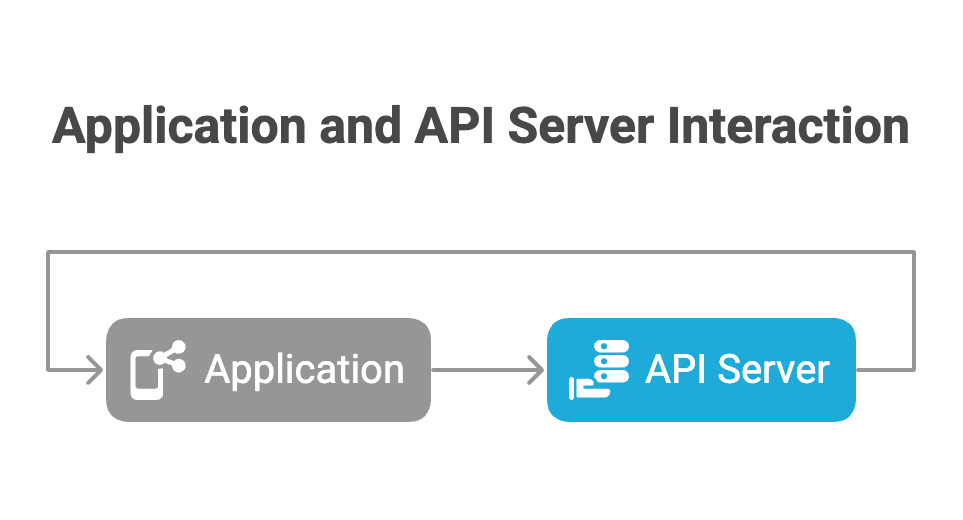
The client knows the API exists, has the URL, and explicitly codes against the contract. Two-party, direct, predetermined.
MCP introduces a three-tier model:
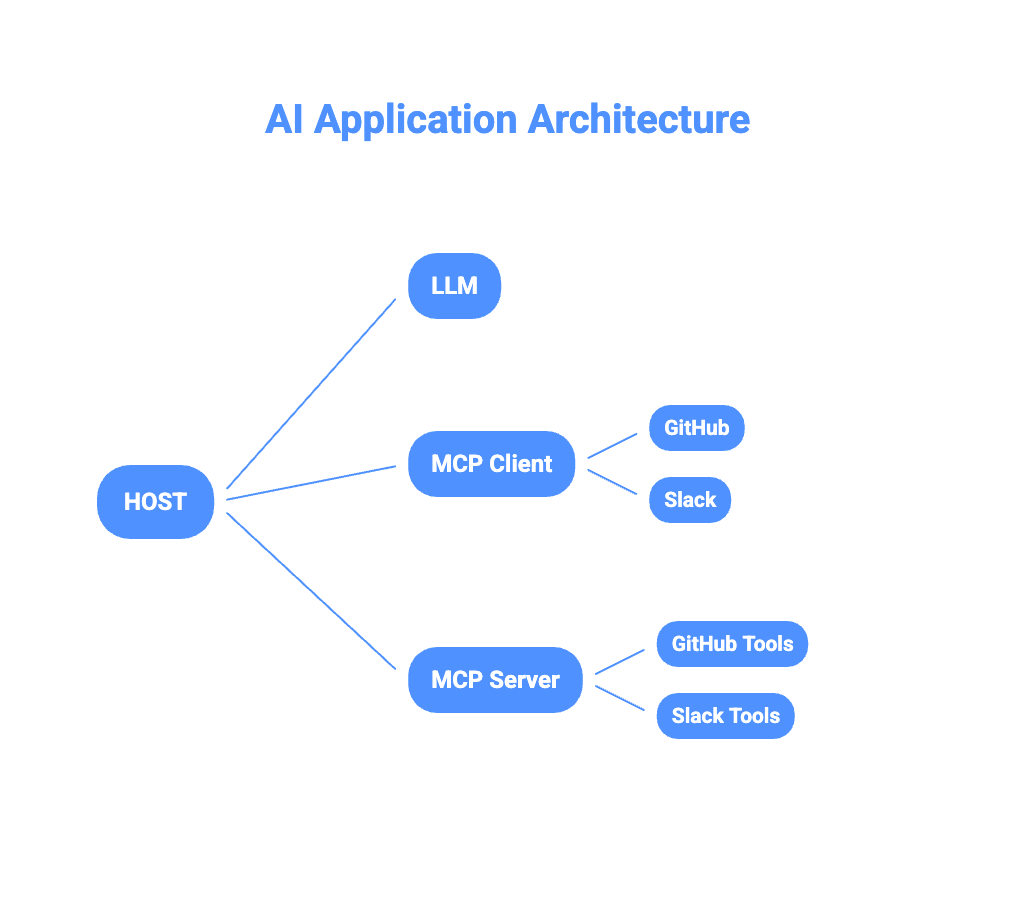
The Host is the AI application — Claude Desktop, Cursor, or your custom agent. It contains the LLM and manages multiple MCP clients simultaneously. Each MCP Client holds an isolated, persistent connection to a single MCP server. The LLM reasons about which tools to invoke but never directly touches the network — it works through the client abstraction layer.
This three-tier structure matters for security. Each server operates in isolation — one MCP server cannot see what another is doing. The LLM reasons about tools without ever seeing underlying API keys or sensitive endpoints.
How the Protocol Actually Works
REST APIs are stateless. Each HTTP request is a complete, self-contained transaction with no memory of what came before:
GET /api/v1/orders?user=123
Authorization: Bearer token123

# Completely independent of any previous request
GET /api/v1/orders?user=123&page=2
Authorization: Bearer token123
MCP uses JSON-RPC 2.0 over a persistent connection with a formal three-phase lifecycle.
Phase 1 — The Handshake: When an MCP client connects, it negotiates capabilities with the server:
// Client sends
{
  "jsonrpc": "2.0",
  "id": 1,
  "method": "initialize",
  "params": {
    "protocolVersion": "2024-11-05",
    "capabilities": { "roots": {"listChanged": true} },
    "clientInfo": {"name": "Claude Desktop", "version": "1.0.0"}
  }
}

// Server responds with what it offers
{
  "jsonrpc": "2.0",
  "id": 1,
  "result": {
    "capabilities": {
      "tools": {},
      "resources": {"subscribe": true}
    },
    "serverInfo": {"name": "github-server", "version": "1.0.0"}
  }
}
After this handshake, capabilities are locked. Neither party can use features not agreed upon at initialization — enforced by the protocol, not convention.
Phase 2 — Operation: The client discovers and invokes tools. The LLM calls tools/list to see what’s available, then tools/call to execute. Critically, the server can also initiate requests back to the client — asking the LLM to reason about something (sampling) or asking the user for input (elicitation). This bidirectional flow is impossible in REST.
Phase 3 — Shutdown: Graceful termination with explicit acknowledgment before the transport closes.
The result is a session that maintains context across calls, enables server-push notifications, and supports complex multi-step workflows that would require significant custom orchestration code with traditional APIs.
MCP Connectors: Solving the M×N Integration Problem
Every developer who has built integrations knows the M×N problem. Connect M applications to N services and you need M×N custom integrations — each with different auth patterns, error handling, data formats, and rate limiting behavior. The maintenance burden compounds with every new connection.
MCP connectors reduce this to M+N.
Write one MCP server for GitHub, and any MCP-compatible host — Claude Desktop, Cursor, your custom agent — can use it immediately. Write one MCP client into your host application, and it connects to any MCP server. The protocol handles discovery, auth negotiation, and error standardization. You write the business logic once.
The practical pattern:
AI Agent → MCP Client → MCP Server → REST API → Data SourceThe MCP server is almost always a wrapper around an existing REST API. An MCP GitHub server exposes tools like create_issue and list_pull_requests, but internally calls GitHub’s REST API. The MCP layer adds capability discovery, session state, and a standardized interface the AI can reason about.
This is why “MCP replaces APIs” is a misconception. MCP orchestrates APIs. REST endpoints still exist and handle actual data operations. MCP adds the semantic layer that lets an AI agent understand what those operations mean and decide when to use them.
MCP connectors currently exist for most major developer tools — GitHub, Linear, Slack, Notion, Postgres, filesystem access, web search, and dozens more. The ecosystem is growing rapidly because writing an MCP server is straightforward once you understand the protocol.
Claude MCP: What It Looks Like in Practice
Claude MCP is how Anthropic’s Claude models interact with external tools through the protocol. Claude Desktop ships with built-in MCP client support, and it’s increasingly how developers build Claude-powered agents.
Here’s what happens when a user asks Claude to “create a GitHub issue for the login bug and post it in the engineering Slack channel”:
Step 1 — Discovery: Claude’s MCP client queries connected servers. It finds a GitHub MCP server with a create_issue tool and a Slack MCP server with a send_message tool.
Step 2 — Reasoning: The LLM examines the tool schemas — parameter names, types, descriptions — and determines the goal requires calling both tools in sequence, using output from the first as input to the second.
Step 3 — Execution:
// First call — create the issue
{
  "method": "tools/call",
  "params": {
    "name": "create_issue",
    "arguments": {
      "repo": "acme/app",
      "title": "Bug: Login crash on mobile",
      "body": "Reported by user — reproducible on iOS 17"
    }
  }
}

// Second call — uses the returned issue URL directly
{
  "method": "tools/call",
  "params": {
    "name": "send_message",
    "arguments": {
      "channel": "#engineering",
      "text": "New issue filed: https://github.com/acme/app/issues/847"
    }
  }
}
No developer wrote orchestration logic connecting GitHub to Slack. The AI reasoned about it from tool schemas alone.
MCP defines six core primitives that make this possible:
- Tools — executable functions the model controls (create, query, send)
- Resources — read-only context the application controls (files, schemas, docs)
- Prompts — reusable instruction templates the user selects
- Roots — filesystem boundaries the server is allowed to access
- Sampling — servers can request LLM completions from the host mid-workflow
- Elicitation — servers can request clarification from the user before continuing
Sampling and elicitation are what enable genuinely agentic workflows — a server can pause mid-task to consult either the AI or the user before proceeding.
Security: The Dual-Layer Model
Traditional API security is a single-layer problem: authenticate the caller, authorize the action, protect the token. OAuth2 and API keys over HTTPS largely covers it.
MCP requires a dual-layer model because there are now two distinct authentication relationships.
Layer 1 — MCP Client to MCP Server: Who is the AI application and is it allowed to connect? Uses OAuth 2.1 with PKCE. The MCP server validates the client’s bearer token before processing any tool calls.
Layer 2 — MCP Server to Upstream API: What can the authenticated user actually access? The MCP server holds its own credentials for the upstream service and maps the authenticated MCP session to appropriate upstream permissions.
The critical rule the spec enforces: token passthrough is prohibited. The MCP server cannot forward the client’s OAuth token directly to the upstream API — it must use separately scoped credentials.
The practical result: the LLM never sees API keys, sensitive endpoints, or upstream credentials. Compromising the reasoning layer doesn’t automatically compromise the services it connects to. The MCP server acts as an auditable security boundary between the AI and the underlying infrastructure.
When to Use Which
| Scenario | Traditional API | MCP |
|---|---|---|
| Mobile/web app to backend | ✓ | — |
| Microservice to microservice | ✓ | — |
| AI agent with 1–2 integrations | Either | — |
| AI agent with 3+ integrations | — | ✓ |
| Dynamic tool discovery needed | — | ✓ |
| High-throughput, horizontal scale | ✓ | — |
| Non-AI application | ✓ | — |
| Agentic, multi-step workflows | — | ✓ |
The crossover point where MCP starts paying off is roughly 3–5 integrations. Below that, the protocol overhead isn’t worth it. Above that, standardization and dynamic discovery compound into meaningful development time savings.
Worth noting: MCP and REST aren’t mutually exclusive. A common production setup uses REST APIs for service-to-service communication and data operations, with MCP servers wrapping those same APIs to expose them to AI agents. Same underlying capability, two different interfaces for two different consumers.
What Comes Next
The next step is getting hands-on: building your own MCP server to wrap an existing API or service. A follow-up post on how to build an MCP server will walk through implementation — choosing a transport (STDIO for local tools, Streamable HTTP for remote services), defining tool schemas, handling the initialization handshake, and deploying a server that Claude or any MCP-compatible host can immediately connect to.
The MCP ecosystem is early but moving fast. Connectors exist for most major developer tools, and the pattern of wrapping existing REST APIs is well-established. If you’re building AI-native applications, understanding the protocol now puts you well ahead of where most teams currently are.
Related: How to Build an MCP Server | MCP Security Best Practices | Beginner’s Guide to MCP